
Marketplace Seller Onboarding: Step-by-Step Process + Automation Tips
In 2026, marketplaces don’t lose sellers because they “don’t have enough features.” They lose sellers because onboarding takes too long, feels risky, or becomes a support problem.
Amazon seller registrations dropped 44% year-over-year to 165,000 new sellers in 2025, implying high pre-registration drop-off or stricter barriers (Marketplace Pulse).
Marketplace seller onboarding is how you verify, set up, and activate sellers so they can list products and start fulfilling orders. In this guide, we’ll break down a practical, step-by-step onboarding process, and show where automation helps you onboard faster without bloating your marketplace with extra features.
What Is Marketplace Seller Onboarding?
Marketplace seller onboarding is the process of verifying, setting up, and activating new sellers so they can list products and fulfill orders successfully.
In practice, it takes a new seller from “I want to join” to:
- verified and approved
- fully set up (profile, store, payout details)
- ready to list products that meet your standards
- operationally prepared for shipping, disputes, and returns
- successfully completing their first orders
The goal is time-to-first-sale, with minimum friction and maximum quality.
Note: In this guide, we use “seller” and “vendor” interchangeably to refer to businesses that list and fulfill products on your marketplace.
Why Seller Onboarding Matters
Seller onboarding affects everything that makes a marketplace valuable:
- Supply quality (better listings — better conversion)
- Buyer experience (fewer delays, fewer disputes, fewer refunds)
- Operational efficiency (less manual checks and repetitive support)
- Marketplace liquidity (more active sellers = more inventory depth)
Registration is not success. Activation is. Most importantly, onboarding sets expectations. That’s why you should treat it as an onboarding strategy, not a registration task. If sellers don’t understand your rules, payouts, or shipping logic early — they will “learn” later through cancellations, angry buyers, and dispute tickets.

Example: GarageSaleIt Seller Guide
CS-Cart Multi-Vendor supports a streamlined vendor sign-up flow designed to minimize early drop-off. Vendors access it via a storefront link, “Become a Seller”, where admins configure profile fields under “Vendor Information” to include only email/phone, password/SSO, business type, country/region, and optional store name.
Marketplace Seller Onboarding Step-by-Step Process
Below is a practical marketplace seller onboarding flow that works for most marketplace models: B2C, B2B, niche, local, or multi-storefront. Each step is designed around clear activation milestones that sellers can complete quickly.
1. Sign-Up and Registration
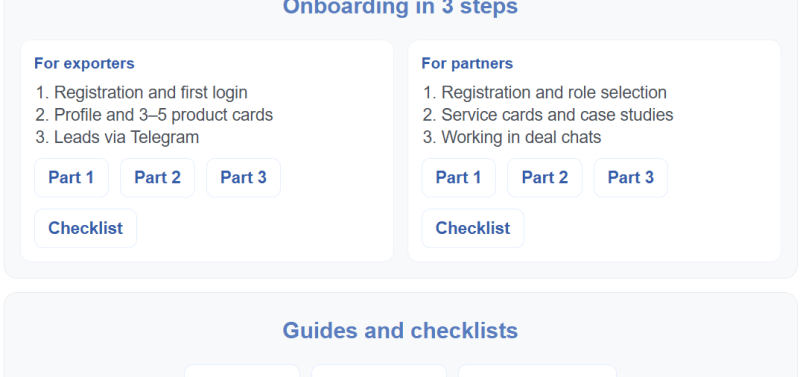
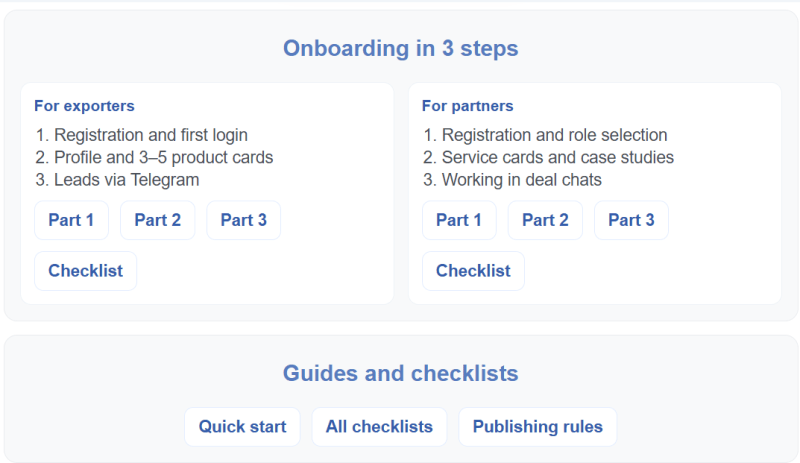
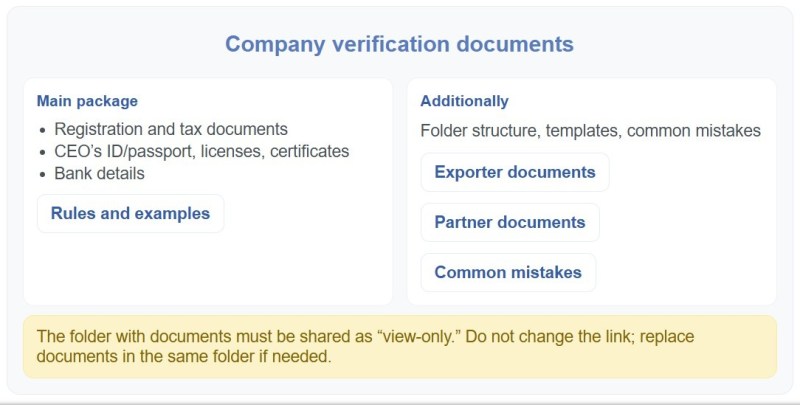
B2Brics is a marketplace built on CS-Cart. They use a detailed onboarding guide to attract and onboard quality vendors. Over 100 suppliers, 300+ importers, and 30+ partners joined the platform in two months.
This is your first drop-off point. If sellers struggle here, they’ll never reach verification.
Your goal: collect only what’s needed to create an account—and prove value fast. If you want to onboard sellers on a marketplace efficiently, keep this step short and predictable.
What to include at this step:
- email / phone
- password or SSO
- business type (individual / company)
- country / region (important for payouts + taxes)
- basic store name (optional)
Best practice: show a progress bar like “Step 1 of 5” so sellers feel the progress. This also helps sellers stay engaged throughout the onboarding funnel.
2. Seller Verification
Verification is where many online marketplaces accidentally kill momentum.
Depending on your marketplace type, verification may include:
- identity documents (KYC)
- business registration details
- tax ID / VAT number
- address confirmation
- bank account ownership checks
The exact requirements may vary, but marketplace seller verification always needs clear instructions and predictable timelines.
What you should communicate clearly:
- why you require verification
- what documents are accepted
- how long it takes
- what happens if something is rejected
Your seller onboarding solution should also show status updates and next steps so sellers don’t stall.
Pro tip: give sellers a “verification checklist” before they start uploading files.
3. Agreements and Marketplace Rules
This step protects your marketplace long-term.
What should be covered:
- seller agreement acceptance
- commission and payout policy
- prohibited products
- delivery time requirements
- cancellation rules
- dispute and return policy (what happens when buyers complain)
For more clarity on commissions, responsibilities, and payout logic, define your monetary relations with vendors early in onboarding. Don’t make it a wall of legal text. Most sellers won’t read it in full.
Better approach: show short “Key Rules” bullets + require agreement confirmation.
4. Store Setup and Seller Profile Completion
Now sellers need to look real and trustworthy. This is a key moment in the marketplace seller onboarding process because it directly affects buyer trust.
Core setup fields:
- store logo + cover image
- store description
- contact info (support email, phone)
- address and pickup/shipping location(s)
- working hours (for local delivery models)
What you’re really building here:
- buyer trust
- seller accountability
- support and dispute transparency
Pro tip: show a “profile completeness score” (70%+ is usually enough to go live). It keeps the process measurable and creates a seamless onboarding experience without extra support.
5. Product, Pricing, and Content Standards
This step determines how your marketplace looks and how well it sells. In a marketplace vendor onboarding process, standards like these prevent low-quality listings from scaling.
You want sellers to list products fast.
Define standards for:
- titles and naming conventions
- product descriptions (what must be included)
- product photos (formats, minimum quality)
- attributes normalization rules (size, color, material, compatibility, etc.)
- category mapping rules
- product feed format requirements
- prohibited keywords and misleading claims
Pricing rules should include:
- minimum / maximum allowed pricing (if relevant)
- currency and rounding rules
- discount policy
- refund responsibilities (who pays what)
Pro tip: include a “sample perfect listing” so sellers copy the format.
6. Shipping and Order Handling Basics (Including Disputes and Returns)
This is where onboarding becomes operational—and where marketplaces either scale cleanly or collapse under support load.
Sellers must clearly understand:
- shipping methods they can use
- processing time expectations
- packing requirements
- tracking requirements
- cancellation rules
- fulfillment responsibility (seller vs marketplace)
Make it clear who owns buyer communication, who pays for return shipping, and how chargebacks are handled—this is where many sellers hesitate to go live. To reduce operational chaos, document how you manage shipping across vendors, carriers, and fulfillment models.
Disputes (Chargebacks, Claims, Buyer Complaints)
Sellers should know:
- what counts as a dispute
- what evidence they must provide (tracking, photos, invoice)
- dispute resolution timeline
- who makes the final decision (you vs seller)
Returns and Refunds
Make sure sellers understand:
- return eligibility rules
- return window (e.g., 7/14/30 days)
- return shipping responsibility
- refund timing rules
- partial refunds (damaged packaging, missing parts)
Best practice: create “disputes & returns” templates sellers can copy-paste into buyer messages.
For example, Alibaba Seller Center has the Trade Assurance section that allows filing claims with evidence upload, mediation timelines (3-5 days initial response), and status trackers.
7. Payout Setup and Tax Details
This step is where sellers start thinking: “Will I actually get paid?”
If payout setup is confusing, sellers delay activation. Marketplace vendor onboarding should remove uncertainty here with simple payout examples and clear timelines.
What you need here:
- payout method selection
- bank details / Stripe Connect / PayPal / manual payout rules
- payout schedule (weekly, bi-weekly, monthly)
- payout holds / rolling reserves for new sellers
- minimum payout threshold
- commission & fees breakdown
- tax configuration (VAT / sales tax / invoices if needed)
Pro tip: show sellers a simple payout example: “If you sell $100 and commission is 10%, you receive $90 (minus payment fees if applicable).”
8. Seller Go-Live and First Orders
This is the most important moment in onboarding:
- the seller is approved
- products are listed
- shipping is configured
- payout details are ready
- now you need them to get their first successful orders
If sellers go live but struggle to get traction, you’ll also need a plan for how to attract sellers and keep supply growing after launch.
What to do right after go-live:
- show “Seller launch checklist”
- recommend launching with 10–30 high-quality SKUs (instead of 1 product)
- provide promo tools (coupons, free shipping option, bundles)
- educate on fast response time and order acceptance
Best practice: your onboarding isn’t finished until:
- seller has at least 1 delivered order
- there are no disputes or cancellations in their first few orders
If you build seller onboarding for marketplaces as a guided system (not a form), you’ll activate sellers faster and reduce disputes, cancellations, and support load.
How to Onboard Sellers Faster Without Losing Quality
Speed matters in onboarding, but not because “faster is better” by itself. In marketplace onboarding, speed matters because sellers evaluate your marketplace while they’re onboarding. If the process feels long, unclear, or risky, they stop investing effort and switch to another channel.
The challenge is that quality matters just as much. If you remove every check and approve everyone instantly, you’ll launch more sellers — and then spend months cleaning up low-quality listings, managing disputes, and handling refund pressure.
The goal is a controlled onboarding system: less friction for the right sellers and more guidance (or more checks) where risk is higher. One of the highest-impact areas to standardize is the seller onboarding process for payouts, since uncertainty here blocks activation.
Reduce friction in registration
Most marketplaces accidentally turn onboarding into bureaucracy: too many fields, too many screens, too many “mandatory” details that aren’t actually required to start. Sellers don’t want to “fill out a profile” — they want to begin selling. The fastest flows aren’t always the shortest, they’re the clearest: sellers move quickly when they understand what happens next, how long it takes, and what success looks like.
A strong registration flow removes uncertainty and effort early. Keep sign-up short and predictable, and split onboarding into two layers: what’s required to enter the system vs. what’s required to go live. Don’t force sellers to make big decisions upfront (categories, shipping logic, branding, tax setup). Collect deeper details later, and explain each request with a simple reason: verification, payouts, or listing quality. Reveal steps as a guided sequence (account → verification → rules → setup → listings → go-live), let sellers save progress, support social login, and validate fields instantly. Most importantly, stay consistent — no surprise requirements halfway through.
Use templates, checklists, and training
If you want onboarding speed without quality loss, you need one thing more than automation: standardization.
Sellers often fail onboarding not because they can’t do it, but because they don’t know what “good” looks like. They upload poor photos, write unclear product descriptions, set unrealistic shipping times, and skip attributes that are critical for buyer decisions. Then you either reject their listings and create frustration, or approve them and damage the buyer experience.
Templates solve this without heavy enforcement. They’re also a core element of premium marketplace onboarding because they prevent mistakes before they happen. When sellers receive a good product listing template, a pricing checklist, and a shipping policy example, they stop improvising. They follow the structure that already works for your marketplace.
Training doesn’t have to be long or “educational.” In practice, short and practical materials work best: a one-page checklist, two-minute videos, a sample perfect listing, and short guidelines for returns and disputes.
This also removes load from your team. Every template you provide eliminates dozens of repetitive questions. And every checklist reduces your moderation work because sellers correct issues before submission.
Segment sellers by readiness
Not all sellers require the same onboarding depth. Treating them equally is one of the biggest reasons onboarding becomes slow.
A more effective approach is segmentation: classify sellers by readiness and risk level, then apply different onboarding tracks. This lets marketplace operators scale supply faster while still protecting buyer experience.
For example, an established business with a website, clear product catalog, and valid registration information can often go through a fast track. You verify quickly, ensure payout compliance, and push them toward listing and activation. These sellers bring supply depth and tend to become stable partners.
On the other hand, early-stage sellers or high-risk categories may need a full onboarding path: stricter verification, additional content requirements, mandatory training, and review before publishing listings.
This doesn’t have to be complicated. Even basic segmentation works: based on country, category, product type, past online marketplace experience, or business documentation.
Fast track helps you grow supply and liquidity quickly. Full onboarding protects the marketplace from quality issues. Together, they create speed without losing control. And that’s a prerequisite for sustained growth as your supply expands.
Provide onboarding support and help channels
Segmentation is only effective if sellers feel supported, not punished. If someone lands in the full onboarding track, they should understand why and what the timeline is. Otherwise, they assume the marketplace is blocking them for no reason.
Support here isn’t about hand-holding. It’s about making requirements and timelines crystal clear. Sellers need a list of what they must complete, what will be reviewed, and what is optional.
You can also reduce support load by embedding help into the flow. Instead of forcing sellers to contact you, give them inline explanations at the exact moment they might get stuck. For example: a short hint next to the tax ID field, a payout example on the payout step, a “minimum listing requirements” reminder before product submission.
This is often faster and more scalable than expanding support.
Set expectations early
Most marketplace problems don’t start at first order. They start at onboarding — when expectations are not established.
Sellers need clarity on the marketplace model: what success looks like, what the rules are, how payout timing works, and what performance is expected. If you use split payments, explain early how payouts are triggered and what happens in disputes or refunds. If sellers assume they will get instant sales, immediate payouts, and zero disputes, they will quit the moment reality doesn’t match.
Setting expectations early is also a quality tool. If you are strict about shipping time, say it early. If your marketplace requires fast response rates, say it upfront. If you enforce refund timelines, make it part of onboarding, not part of conflict resolution.
The best expectation setting is practical and specific. A few clear resources upfront prevent confusion later. Sellers don’t need motivational messaging. They need operational clarity: how long verification takes, how approval works, what triggers listing rejection, how disputes are handled, and who pays for returns.
When sellers understand how the system works, onboarding becomes smoother, support becomes lighter, and your marketplace becomes easier to scale.
How to Use Automation and AI for Seller Onboarding
The best onboarding systems remove repetitive manual work, keep sellers moving forward even when your team is offline, and prevent the same quality issues from repeating across hundreds of new accounts.
The key is sequencing. If you try to automate everything at once, you end up with fragile logic and inconsistent decisions. If you automate the right steps first, onboarding becomes faster, clearer, and more predictable without sacrificing control.
What to Automate First
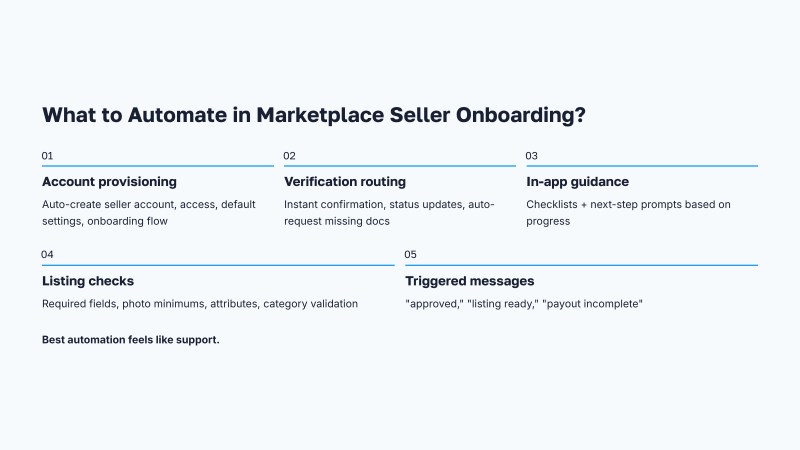
Start with the parts of onboarding that are high-volume, rule-based, and easiest to standardize. These are the steps where human involvement adds the least value, but consumes the most time.
One of the highest-impact areas is registration and account provisioning. The moment a seller signs up, the system should automatically create everything they need to proceed: a seller account, access to the vendor area, default storefront settings, and a guided onboarding flow. The seller should never be stuck waiting for someone to “activate access” manually.
The second priority is verification routing. You may not be able to fully automate verification itself, but you can automate what happens around it. Sellers should receive immediate confirmation that their documents were submitted, clear status updates, and an automatic request for missing data if something is incomplete. Even a simple rule like “request resubmission if a required document is missing” can prevent days of delay and reduce support tickets.
The third area is onboarding guidance. Most sellers need the same help at the same moments. That makes the process ideal for automated checklists, tooltips, and step-by-step prompts inside the interface. This guidance reduces errors early and minimizes ongoing support later. If the seller completes their profile but hasn’t added payout details, they should see the next step instantly. If they try to submit a product without required attributes, the system should block submission and show exactly what’s missing.
Product listing quality control is another strong automation candidate. You don’t need AI to improve quality at the start. Basic rules already reduce most issues: enforcing minimum photo count, banning empty descriptions, requiring key attributes, or validating category selection. Automated checks protect buyers and reduce moderation workload while keeping the seller moving forward.
Finally, automate early lifecycle communication. Sellers shouldn’t rely on memory or guesswork. If your system automatically sends short, well-timed onboarding messages based on progress (for example, “verification approved,” “your first listing is ready for review,” “payout setup is incomplete”), you reduce drop-off without adding pressure through sales outreach.
Automation works best when it feels like guidance. The seller should feel supported and clearly directed.
Where AI Delivers the Highest ROI
AI becomes valuable when onboarding stops being purely rule-based and becomes content-heavy.
The most obvious use case is product content readiness. Sellers often struggle to write good listings quickly, especially at scale. AI can help them generate titles, descriptions, bullet points, and attribute suggestions based on a product name, specs, or supplier feed. This improves both speed and consistency. It also reduces the number of low-quality drafts your marketplace needs to reject or manually edit.
CS-Cart AI uses GenAI (OpenAI, Gemini) to generate titles, descriptions, and attributes from product specs or feeds, reducing low-quality drafts. Bulk import tools with AI assistance speed listing creation during onboarding.
Get more AI tools from our article: AI Tools for eCommerce
Another high-ROI area is listing quality review. AI can evaluate whether product content meets your marketplace standards before it reaches buyers. For example, it can flag vague descriptions, inconsistent pricing logic, missing compatibility information, prohibited claims, or low-value titles. You still keep human control, but your team spends time on edge cases instead of reviewing every listing from scratch.
CS-Cart built-in approval workflows pair with AI add-ons for flagging issues like vague descriptions or pricing anomalies pre-moderation. Vendor Panel API enables risk detection via early signals (e.g., incomplete profiles), routing high-risk sellers automatically.
AI also works well for onboarding assistance. Combined with tutorials, this helps sellers resolve questions without leaving the onboarding flow. Instead of forcing sellers to search documentation or wait for support, an AI assistant can answer questions inside the onboarding flow. This is especially effective for payout setup, shipping configuration, and returns rules, where sellers often ask the same questions in different words. The marketplace wins because sellers move forward faster, and your support team stops answering repetitive requests.
Risk detection is another strong area. AI can help identify sellers who are likely to churn or cause operational issues based on early signals: incomplete profiles, repeated listing rejections, unusually high price variance, unrealistic delivery time settings, or suspicious account patterns. This allows you to proactively route these sellers into the “full onboarding” path or offer targeted help.
AI chatbots like Freshdesk or Zoho SalesIQ integrate directly with CS-Cart for contextual help on payouts, shipping, and rules within vendor panels, cutting repetitive tickets. OneHash.ai connects via SyncSpider for automated guidance flows.
The best way to think about AI in onboarding is simple: it should reduce writing effort, reduce review time, and prevent problems before they become disputes.
How to Measure and Improve Seller Onboarding
To improve marketplace seller onboarding, you need to measure activation—not just registrations. You can’t improve onboarding by intuition. Marketplace teams often optimize the wrong parts because they measure onboarding as “how many sellers registered.” Activation is the real milestone.
A strong onboarding system is measured by how quickly sellers reach first value, how many get there, and how stable they are after launch. This is the foundation of continuous improvement in seller onboarding.
Key Onboarding Metrics
Completion Rate
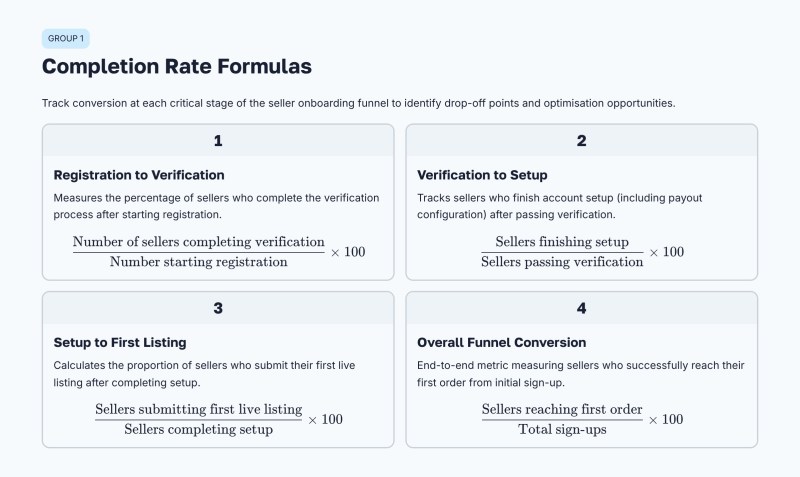
The first metric you need is completion rate by stage. Sellers don’t fail onboarding at random — they fail at specific steps. You should track how many sellers move from registration to verification, from verification to setup completion, and from setup completion to first live listing.
Completion Rate Benchmarks
Average onboarding checklist completion stands at 19.2% across industries, with FinTech at 24.5% and smaller firms ($1-5M revenue) reaching 27.1%. Marketplaces targeting 75%+ completion see better activation, where a 25% activation gain drives 34% revenue growth; fast activators (under 48 hours) hold dropouts below 10%, versus 40%+ beyond two weeks (Appscrip).
Time-Based Metrics
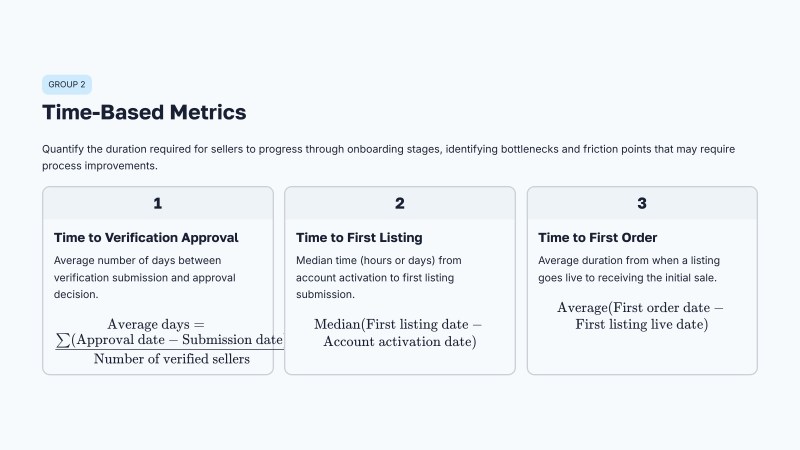
Time-based metrics matter just as much. It’s not enough to know that sellers eventually finish. You need to know how long it takes. Track time to verification approval, time to first listing submitted, and time to first order. These numbers tell you where your marketplace is slow and where sellers lose momentum (Dotfile). These onboarding KPIs fit into the bigger system of how you measure your marketplace success as you scale.
Time-Based References
Traditional onboarding averages 3-5 days minimum, often stretching to 6-8 weeks with 40% abandonment; automated systems cut this to 5 minutes or under 5 days. Time-to-first-SKU under 48 hours correlates with <10% abandonment and $15,000-$50,000 daily GMV per vendor avoided loss.
Quality and Support Metrics
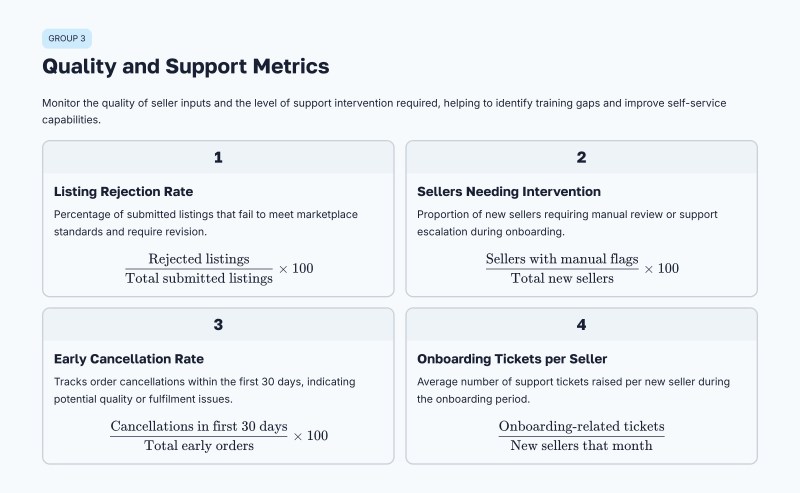
Quality metrics must be included, or you risk optimizing for speed at the expense of buyer experience. Track listing rejection rate, the percentage of sellers needing manual intervention, early cancellation rate, and dispute rate during the first weeks. These indicators show whether onboarding produces reliable sellers, not just active accounts. They also correlate with seller satisfaction, especially in the first weeks after activation.
Finally, measure support load caused by onboarding. When onboarding is unclear, it creates tickets. Track the number of onboarding-related tickets per new seller, and identify the top reasons sellers contact support. If one issue dominates, fix the flow instead of hiring more people.
Quality and Support Benchmarks
Listing rejection rates drop from 12% to <1% with automation; early intervention needs affect most new sellers, though exact aggregates lack. Onboarding tickets per seller serve as key indicators, with top issues like unclear status driving spikes—manual processes inflate this 30-50% above automated baselines (Veridion).
Common Drop-Off Points
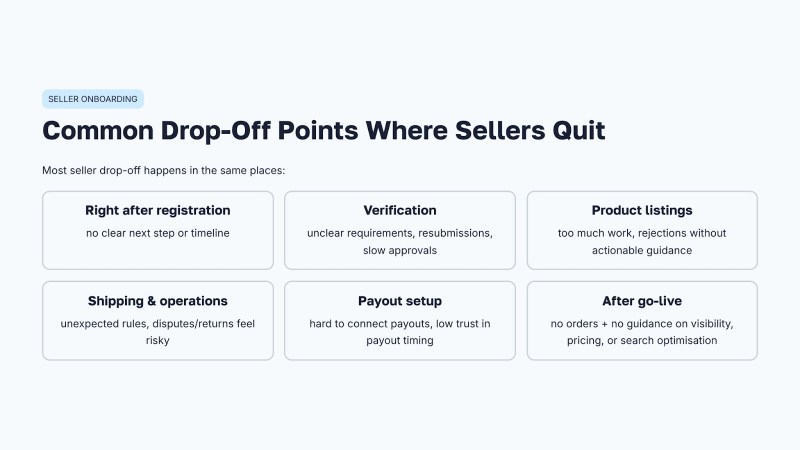
Seller drop-off usually happens at the same few stages.
The first is right after registration, when the seller doesn’t receive a clear next step or the value of proceeding is not obvious. If sellers don’t understand how long it takes and what happens next, they stop.
The second is verification. Sellers drop off when document requirements feel unclear, excessive, or inconsistent. This is especially common when the approval process requires multiple resubmissions, or when approval times are not communicated.
The third drop-off point is product listing creation. Sellers often underestimate how much work is required to meet content standards. If the marketplace rejects listings without giving actionable guidance, sellers leave rather than iterate. This is where templates, examples, and AI-assisted content generation create immediate ROI.
Another drop-off point is shipping and operations. Sellers quit when they realize that shipping requirements are stricter than expected, or when disputes and returns feel like unpredictable risk. If your onboarding does not clearly explain how disputes work and who is responsible for refunds, sellers hesitate to launch.
Payout setup is also a major friction point. When sellers can’t connect a payout method quickly, or don’t trust the payout schedule, they delay activation. Any uncertainty around “getting paid” slows everything down.
Finally, many sellers quit silently after go-live. They publish listings and then receive no orders. This is not only a marketing problem. It can also be an onboarding issue if sellers don’t understand what drives visibility, how to price competitively, or how to optimize listings for marketplace search.
Feedback Loops and Continuous Optimization
Seller onboarding is not something you build once. It is something you refine continuously as supply grows, new categories appear, and operational complexity increases.
The most effective optimization loop is simple: measure drop-off by step, analyze why sellers get stuck, apply a targeted fix, and test again. You don’t need a full redesign to improve onboarding. Small improvements often deliver outsized impact: clearer instructions on one screen, fewer required fields, a better example listing, or an automated reminder at the right moment.
Seller feedback should be collected while they’re onboarding, not after they quit. Short, one-question prompts work best, especially at key steps: after verification submission, after the first listing attempt, and after payout setup. Ask what was unclear, what took too long, and what almost made them stop. This gives you direct insight into friction.
You should also collect internal feedback. Your support and moderation teams know exactly where sellers fail, because they handle the consequences. If the same issue appears repeatedly in tickets, onboarding is the problem — not the seller.
The best onboarding systems also evolve based on marketplace maturity. In early stages, you may prioritize speed and supply growth. As you scale, you tighten quality and standardization. Automation and AI let you change this balance without increasing headcount, because you can enforce standards through systems rather than manual work. As your supply grows, revisit onboarding as part of how to scale marketplace operations without creating support bottlenecks.
Onboarding is one of the few marketplace levers that improves both growth and operations at the same time. If you treat it as a strategic system — not a registration flow — it becomes a long-term advantage.
Conclusion: Build a Scalable Seller Onboarding System with CS-Cart
Seller onboarding is one of the few marketplace processes that affects everything at once: growth, liquidity, seller retention, customer experience, and support costs.
A strong onboarding flow helps you activate sellers faster, but also protects your marketplace from the most common scaling problems — low-quality listings, operational chaos, disputes, and payout misunderstandings. The best results come from balancing three things: clear steps, smart automation, and measurable improvement.
With CS-Cart Multi-Vendor, you can build an onboarding process that supports both speed and control. You can guide sellers through registration, verification, store setup, product standards, shipping rules, payout configuration, and go-live — while keeping the workflow consistent and scalable as your marketplace grows.
If you’re planning to launch a marketplace or improve seller activation, CS-Cart gives you the foundation to build an onboarding system that sellers actually complete — and a marketplace that stays stable after they do. Start with the two biggest levers: registration clarity and payout setup simplicity.
All CS-Cart Products and Services
- ★ CS-Cart Multi-Vendor: free online demo
- ★ CS-Cart Store Builder: free online demo
- ★ Mobile App: App Store, Google Play
- ★ Customer Care: why it’s more than just a tech support
- ★ Upgrade subscription: select and reactivate

Gayane is a passionate eCommerce expert with over 10 years in the industry. Her extensive experience includes marketplace management, digital marketing, and consumer behavior analysis. Dedicated to uncovering the latest eCommerce trends, she ensures her readers are always informed about industry developments. Known for her analytical skills and keen eye for detail, Gayane's articles provide actionable insights that help businesses and consumers navigate the ever-evolving digital commerce landscape.