

In today’s eCommerce, speed and efficiency decide who grows — and who gets stuck. Manual data entry, endless Excel uploads, and disconnected systems slow down sales, frustrate teams, and limit scale. The CS-Cart API changes that.
Think of it not as a “developer-only feature,” but as a toolbox for automation and integration. For growing businesses, it means fewer repetitive tasks and more control without extra staff. For developers, it’s a foundation for building scalable, enterprise-level solutions. From syncing inventory with ERP systems to running a feature-rich marketplace, the API keeps operations lean, accurate, and ready to expand. Successful projects often start with a simple CS-Cart API integration and scale up over time.
What Is CS-Cart API?
The CS-Cart API is a RESTful interface that uses standard HTTP methods (GET, POST, PUT, DELETE) and JSON. It lets you read, create, and update data for products, orders, customers, and more — programmatically.
Authentication is straightforward: you combine the store admin’s email with an API key. Access rights are managed through user groups, so only authorized actions go through. This balance of simplicity and security makes the API safe for production use.
Benefits of Using CS-Cart API
- Automation: you cut out repetitive work (like manual stock updates).
- Integration allows connecting your store to ERP, CRM, shipping, and business intelligence (BI) tools.
- Control: you manage details such as product pricing, customer groups, and order flows.
- Flexibility: you can build mobile apps or custom storefronts.
- Centralization: you run multiple channels and from one backend.
For store owners, this means less chaos and more control. For programmers and development agencies, the CS-Cart Rest API provides the flexibility to build integrations that scale and boost ROI.
How to Implement CS-Cart API in Practice
Quick Start Checklist
- Log in: Admin Panel → Customers → Administrators.
- Enable API access for an admin account.
- Copy the API key.
- Use Basic Auth with email:API_KEY (Base64 encoded).
Get more details from the CS-Cart documentation.
Test it in minutes:
# List products

curl -X GET "https://yourstore.com/api/products?items_per_page=5" \

  -H "Authorization: Basic <BASE64(admin@email:API_KEY)>"

# Create an order

curl -X POST "https://yourstore.com/api/orders" \

  -H "Authorization: Basic <BASE64...>" -H "Content-Type: application/json" \

  -d '{"status":"O","user_data":{"email":"test@example.com"},"products":{"12":{"amount":1}}}'
If you get JSON with products or a new order ID, you’re connected.
Read: Products with Filters and Pagination
GET /api/products?status=A&items_per_page=100&page=2
Use filters (price_from, status=A) to fetch exactly what you need, saving bandwidth and time.
Write: Create/Update Orders
PUT /api/orders/{order_id}
Add notify_user=true to send automatic customer notifications.
Learn more from the CS-Cart API documentation.
Scheduled Syncs
- For large catalogs, break updates into smaller batches and process them step by step to avoid timeouts.
- If an API call fails (e.g., network error), implement a retry mechanism on the integration side.
Error Handling
- 401 Unauthorized → wrong key/header.
- 403 Forbidden → missing privilege.
- 404 → wrong storefront/vendor context.
- 409 → duplicate → fix with idempotency keys.
Always log API calls for audits and debugging.
Performance Tips
- Batch updates in manageable chunks (e.g., 100 items or fewer if your server has limited resources).
- Paginate reads with items_per_page and page.
- Cache frequently used data.
- Respect rate limits and use exponential backoff.
Security Best Practices
- Store keys in .env or a secret manager.
- Always use HTTPS.
- Rotate keys every quarter.
- Grant least-privilege permissions only.
Common Real-World Use Cases
Let’s see where an API can help you, depending on the use case.
Products API
- Inventory Sync helps update stock and pricing from ERP or a PIM system every night.
- Mass Catalog Management allows adding or editing thousands of SKUs using filters and pagination.
Practice
- Automatically sync prices and stock from your ERP or supplier system every night.
- Update thousands of products at once instead of manually editing.
Advice
- Save time and reduce errors by syncing only changes, not the whole catalog.
- Always keep a simple error log so you don’t miss failed updates.
Value → Your store is always accurate, which prevents overselling and builds customer trust.
Orders API
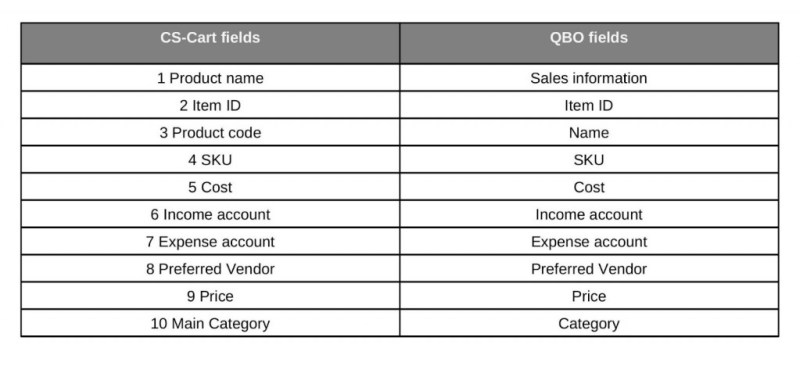
Mapping of fields before connecting QuickBooks accounting system to CS-Cart
- Manage orders programmatically: create, update, and retrieve them via the API.
- Change order statuses to trigger built-in CS-Cart workflows (e.g., email notifications to customers or vendors).
- Sync order data with external systems (ERP, accounting, or 3PL) by letting those systems pull from the CS-Cart API.
Practice
- Update an order’s status (e.g., “Paid,” “Shipped”) via the API to keep customers informed through CS-Cart’s built-in notification system.
- Use the API to export order details (customer, items, totals) for integration with accounting tools like QuickBooks or Xero.
Advice
Rely on CS-Cart’s order IDs as unique identifiers — they ensure consistency across vendors and systems.
Value → Centralized order management: fewer manual updates, consistent statuses, and easy integration with finance or logistics systems that connect to CS-Cart via its API.
Users API
Keep customer profiles and business data aligned across CS-Cart and a CRM (Salesforce, Venturz, HubSpot, etc.) to get a full view of both online and offline orders, customer accounts, and promotions in one place.
Practice
- Use the API to request customer accounts, contacts, products, or promotions from CS-Cart, and to send updates back when changes are needed. External systems manage the sync logic by making these API calls.
- Loyalty & Segmentation. Use the API to fetch customer group memberships and order history from CS-Cart, then let an external loyalty or marketing system calculate and apply discounts, points, or targeted promotions.
Advice
- Define where the “master record” lives: CS-Cart for eCommerce entities, Salesforce for customer relationships and reporting.
- Use middleware (e.g., Heroku Connect) or custom scripts to ensure data flows both ways and stays up to date.
Value → A unified view of your business: one system for sales and orders, another for customer relationships and analytics. Together, they deliver automated processes, deeper insights, and more personalized offers that foster loyalty and drive repeat sales.
Analytics
Export order and sales data into analytics tools to track KPIs.
Practice
Connect BI tools (e.g., Power BI, Google Analytics, Tableau) to pull this data through API requests, or build an integration layer that periodically exports it for reporting.
Advice
- Stick to a clear set of fields, so your reports don’t break.
- Refresh only new or changed data to save time and resources.
Value → Better visibility into your business performance and smarter decisions based on real data.
Mobile Apps
Use the API as the backend for React Native or Flutter apps to deliver native shopping experiences.
Practice
- Use the API as the “engine” behind your mobile shopping apps.
- Start with guest access, then switch to logged-in when customers sign in.
Advice
- Cache product categories locally in the app, so browsing feels fast.
- Only load the data the app really needs.
Value → Seamless mobile experience that drives more sales and improves customer loyalty.
Conclusion
The CS-Cart API is your growth engine:
- For store owners, it allows moving from manual chaos to automated control: syncing stock with ERP, sending orders directly to suppliers, and managing multi-store operations without extra staff.
- For development agencies, it means a stable, open platform for custom storefronts, ERP/PIM integrations, and delivering scalable projects that clients trust.
Start small — test a product sync or automate order exports. Then scale up: multi-storefronts, mobile apps, or advanced marketplace extensions. With the API for CS-Cart, you can save time, cut errors, and grow your eCommerce ecosystem without losing control.
All CS-Cart Products and Services
- ★ CS-Cart Multi-Vendor: free online demo
- ★ CS-Cart Store Builder: free online demo
- ★ Mobile App: App Store, Google Play
- ★ Cloud Hosting: why it’s the best for CS-Cart
- ★ Customer Care: why it’s more than just a tech support
- ★ Upgrade subscription: select and reactivate